Notification Preferences
My Profile (Click your Name) > Notification PreferencesKey Users are Substitutes
My Profile (Click your Name) > Allowed Locations
Key Users are Substitutes
Substitutes and others now have more granular control of notifications and eligibility for specific locations. Please note that the individual user MUST update their preferences on the Allowed Location screen to take advantage of these new features. They can read the full documentation on the main SmartSub Documentation Site:
https://www.smartsub.com/docs/Substitute/ManageAccountAllowedLocations/
Grids and Exports
Home Page > Managed Openings, Location Assignments, Substitute Assignments, Substitute Attendance
*Note that these screens are duplicated under the Location Admin menu options as well.
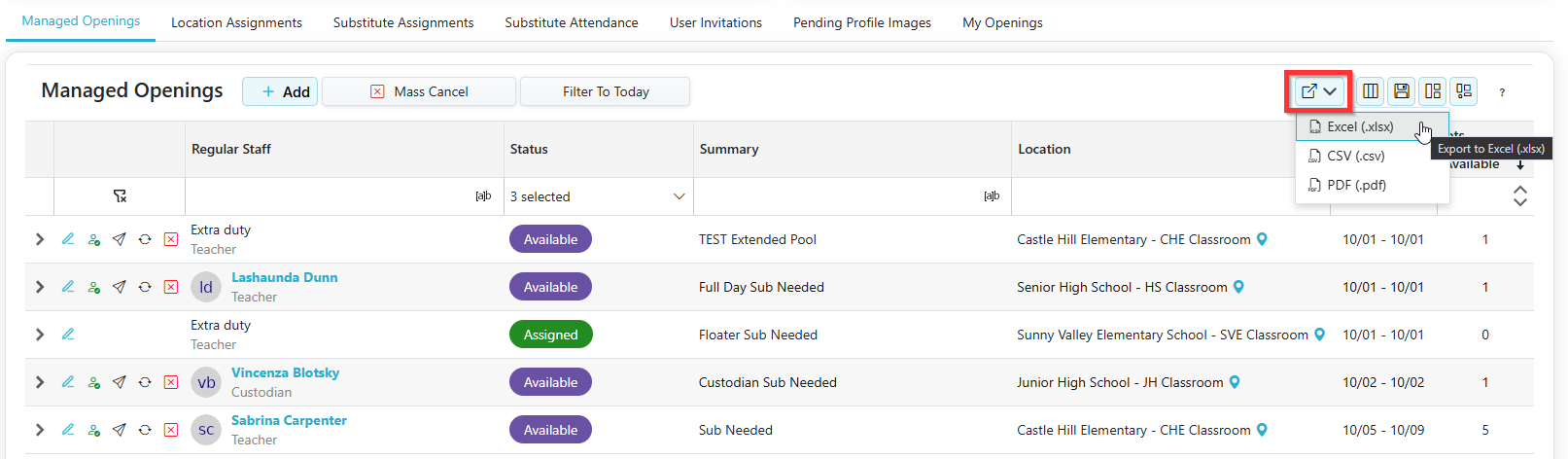
Many of the grids that show on the main screens now have an Export Button and allow you to customize your grids. Details are available on the main SmartSub Documentation Site: https://www.smartsub.com/docs/General/WorkingWithGrids/
However, now on many of the grids, you can click on the Export button to extract the contents of the grid to Excel, CSV, or PDF. This helps for those who would like to see the grid in more of a report format or even for reconciliation purposes.
Third Party Vendor Only
For those districts who use a Third-Party Vendor for their substitutes, the SmartSub system now allows the district to delegate the Third-Party Vendor to assign substitutes to a location and assignment. For details, please contact the CSIU Help Desk (softhelp@csiu.org).
Managing Subs and Openings
Double booking a substitute has been enhanced to prevent substitutes from scheduling conflicts. Assignments in a complete, not attended, and partially complete status are prevented from being assigned to other assignments that have overlapping dates and times.
Location substitute status versus removal: Clarify the difference between reversible deactivation and irreversible removal.
Reserved substitute permissions: Explain that regular staff can view reserved substitutes, while only managers can add or remove them.
Pools
Client Admin > (District Name) Subs > Substitutes
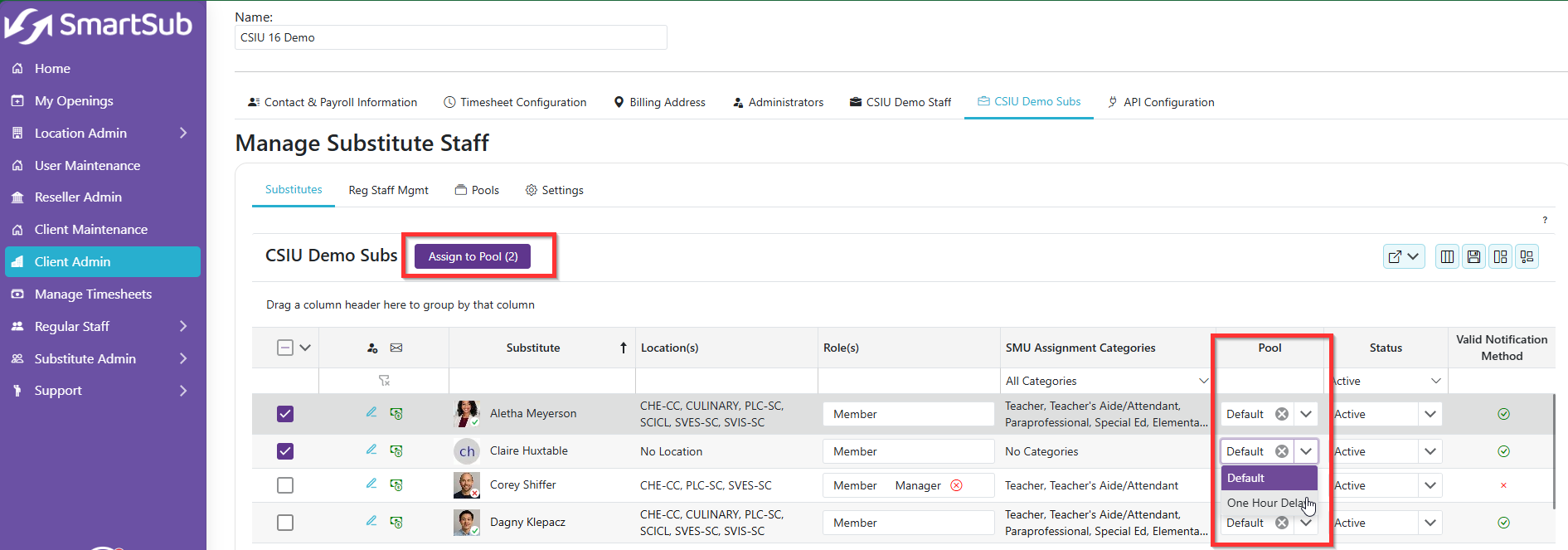
There are now more convenient ways to add substitutes to pools, which include a Mass Add and drop-down from the grid.
Below is a list of key features and updates to the FIS application, that interacts with SmartSub.
FIS Absence Cancelations
FIS > HR/Payroll > Staff > Directories > Staff Notifications
When an absence is canceled in FIS, the person listed to receive SmartSub Notifications receives an email about the cancelation. This notification should help notify the correct person to cancel the assignment in SmartSub.
Please note that we are planning on releasing an automated process for cancelations. The plan is to cancel assignments in SmartSub if an absence is canceled in the FIS system. More deails will be available as we get closer to that release, which should be around Dec 1.
Times on Absences and SmartSub Openings
FIS > HR/Payroll > Staff > Directories > Job Titles
Key Users are Admins
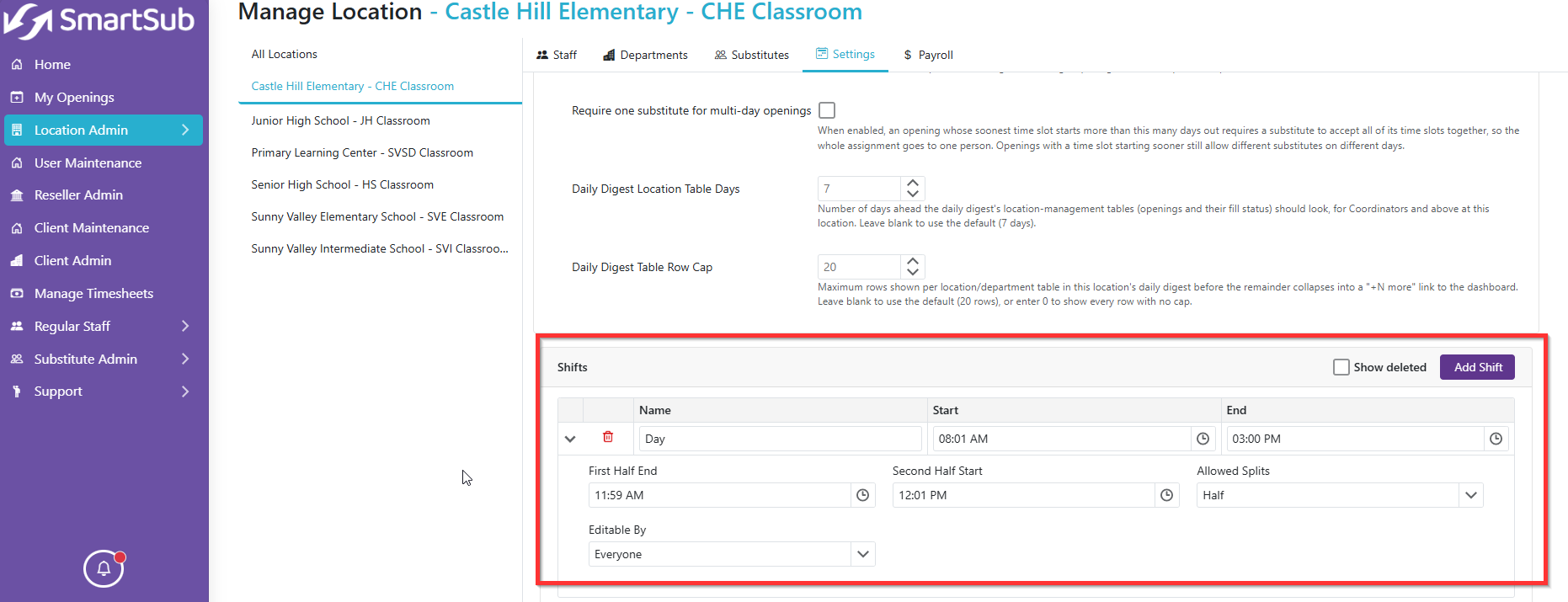
You can now default times on absence request based on the SmartSub location times. In order to take full advantage of this feature, please update your FIS Job Title Directory AND your Location Times in SmartSub (https://www.smartsub.com/docs/LocationManager/ManageLocSettings/)
 SmartSub > Location Admin > Manage Locations > Select a Building > Settings
In conjunction with the FIS > Job Title > Use SmartSub Location Time field, the absence request times default based on the times entered in the SmartSub Location fields. Please note that you ONLY need to have one line for the Full Day and using the greater than sign (>) you can add the First Half End and Second Half Start to identify half day information (as seen in the screenshot below). Do NOT add additional Shifts.
FIS - Substitute Note Field on Absence Entry - Three-Character Issue
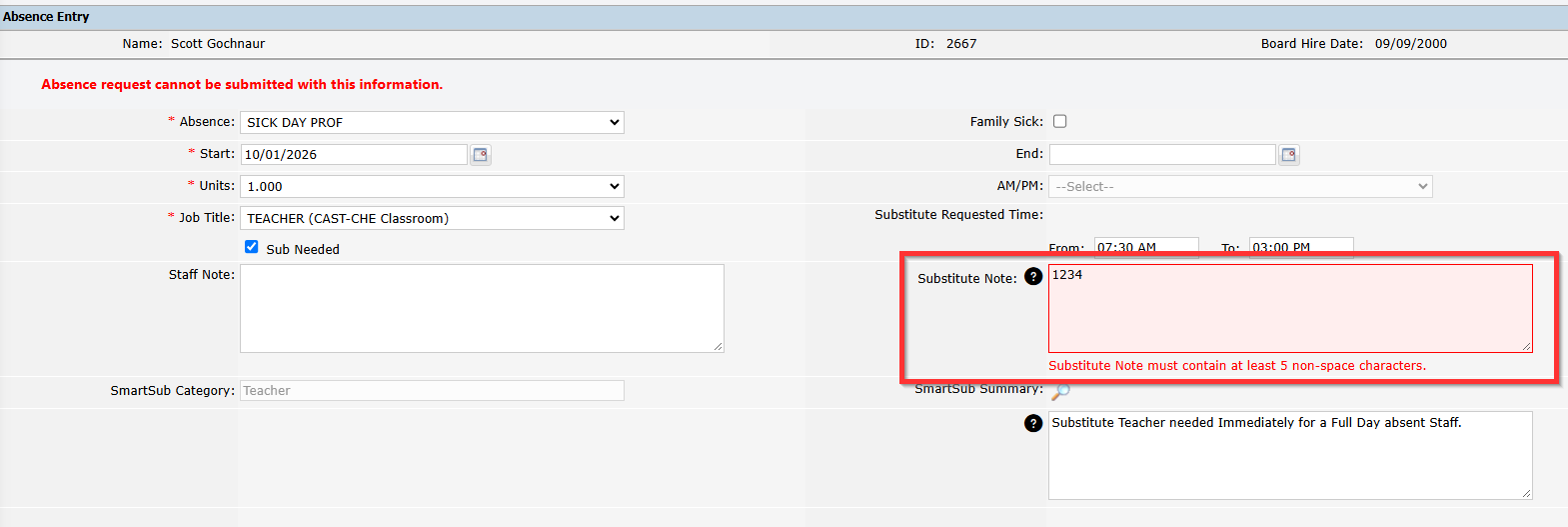
FIS Substitute Note field - Three-Character Issue - Prevents absence request from saving and not being submitted to SmartSub
FIS > Staff Portal > Absence EntryAbsence
Key Users are Teachers/Staff requesting absences who require substitutes
The Substitute Note field in FIS now gives an error if the field has less than 5 characters. This prevents an absence from being submitted and NOT being pushed to SmartSub.
FIS - Building Daily Absence Report
FIS > HR/Payroll > Absence > Reports > Building Daily Absence Report
Key Users are Admins
The Building Daily Absence Report run options now includes the Include Requested Absence option, which allows you to generate the report for those absences that have been requested but NOT yet approved by the staff's supervisor. The report also indicates if a Substitute is needed (based on the Sub Needed checkbox on the Absence Entry screen). Note that when you do the SmartSub > TimeSheet > Request FIS Transfer, the subsitute information populates on the report.


